
How to take a screenshot on iPhone 6 & iPhone 6 plus?
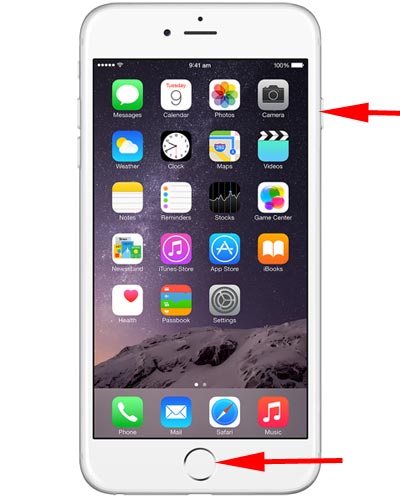
Taking a screenshot on iPhone is not demanding. Hold the Home button and press sleep or wake button for just a sec. Hold both the buttons together until your screen flashes and gives a shutter sound and your screenshot will be automatically saved on the Camera roll. For all the devices which includes iPhone 6, iPhone 6 plus, iPhone 5s, iPhone 5, iPhone 5c & earlier devices and on all iPads you can take a screenshot the same way.
Download App for IOS-Download App for IOS-Moustache Me
How to take screenshot on Android tablet?
Gone are the days where taking a screenshot on the tablet or on your phone was not possible or a pain for everybody. Taking a screenshot on Android 4.0 or above is just few buttons away now. On almost all the tablets & phones you can take a screenshot by pressing holding down the sleep or wake button and the volume down button simultaneously. Hold both the button for just a second until your screen flashes and gives a shutter sound & you’re done with the screenshot on your tablet or on the android phone.
How to take screenshot on Android phones?
For almost all the devices screenshot can be taken the same way as on iPhone & Android tablets as discussed above. But not to forget Android phones may have another features to capture the screenshot as well which is Palm swipe to capture where you need to swipe your hand on the screen and your screenshot will be captured which will be found in Motion & Gestures features on an Android phone.And not to forget if you’re using an old Android device and an older version of android which can be 2.3 Gingerbread or 2.2 Froyo then you’ll have to download an app to take a screenshot which can be found on Google Play-store.
Apps for IOS-Whatsapp Messenger for iPad Download
If you have any queries related to how to take a screenshot on iPhone 6 , iPhone 6 plus , Android Tablet or on Android devices.You can comment below, we will get back to your queries.We are Techmagnetism and We Care.
About Author

No Responses